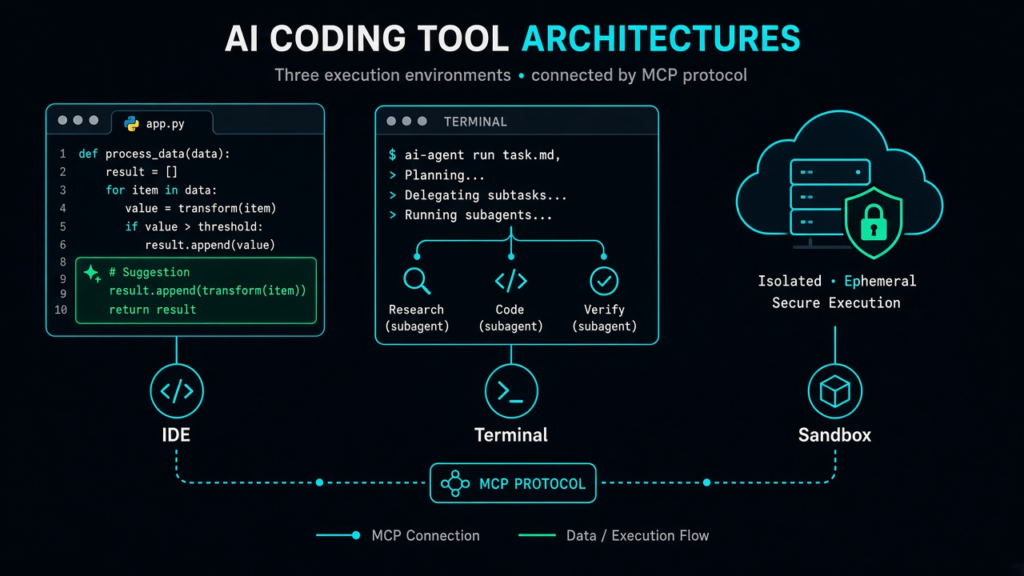
Three tools, three architectures, one goal: an AI agent that helps you ship code faster. Cursor is a VS Code fork with AI built into the editor. Claude Code is a terminal agent from Anthropic with deep reasoning. OpenAI Codex CLI is a terminal agent that runs autonomously in a cloud sandbox. This guide breaks down when to choose each one.
Architecture at a Glance
Cursor is editor-first. You write code in a visual IDE, and the AI works alongside you with tab completions, inline diffs, and multi-file agent mode. It supports Claude, GPT, Gemini, Grok, and Cursor’s own Composer model — all switchable in one interface.
Claude Code is terminal-first. You run it from your shell, and it reads your repository, edits files, runs commands, and can spawn subagents for parallel work. It uses Anthropic’s Claude models (up to Opus 4.6 with a 1M token context window) and excels at complex multi-file refactoring.
Codex CLI is sandbox-first. It runs your task in an isolated environment with OS-level sandboxing (Seatbelt on macOS, Landlock+seccomp on Linux). It connects to OpenAI’s models and supports codex exec for CI/CD automation.
Feature Comparison
All three now support MCP (Model Context Protocol), cloud agents, and subagents. The practical differences are:
- Tab completion: Cursor only. Neither Claude Code nor Codex offers inline autocomplete.
- Visual diffs: Cursor shows changes in the editor. Claude Code and Codex show diffs in the terminal.
- Multi-model: Cursor lets you switch between Claude, GPT, Gemini, and Grok mid-session. Claude Code uses only Anthropic models. Codex uses only OpenAI models.
- Sandboxing: Codex is the strongest (kernel-level isolation). Claude Code uses application-layer hooks. Cursor relies on the editor’s permission prompts.
- Code review: Cursor has Bugbot for PR review. Claude Code has
/ultrareview. Codex relies on manual review. - CI/CD: Codex has
codex execfor scripted workflows. Claude Code has-pflag for non-interactive use. Cursor has Automations for event-triggered agents.
Pricing (September 2026)
All three offer a free tier and a $20/month entry point:
- Cursor: Hobby (free) → Pro ($20/mo) → Pro+ ($60/mo, 3x agent limits) → Ultra ($200/mo, 20x agent limits + $400 third-party model allowance)
- Claude Code: Included with Claude Pro ($20/mo). Claude Max starts at $100/mo for heavier usage.
- Codex CLI: Included with ChatGPT Plus. Codex Pro starts at $100/mo. API key usage also available.
When to Choose Each
Choose Cursor if you want AI inside a visual editor, rely on inline tab autocomplete, use VS Code extensions, or want to switch between multiple AI models in one interface. Best for editor-centric developers and teams transitioning from VS Code.
Choose Claude Code if you need terminal-based agent orchestration for complex refactoring, want the highest reasoning quality (Opus 4.6), or need Agent Teams for parallel task dependencies. Best for senior developers comfortable in the terminal.
Choose Codex CLI if you want to describe a task and let it run autonomously in a sandboxed environment, need CI/CD integration with codex exec, or prefer OpenAI’s model ecosystem. Best for automation-heavy workflows.
Can You Combine Them?
Yes, and many power users do. A common setup is Cursor as the primary editor for daily coding, with Claude Code or Codex CLI for terminal-based automation, CI pipelines, or tasks that benefit from deeper reasoning or stronger sandboxing. The tools are complementary, not mutually exclusive.
TKCursor is an independent AI subscription guide and purchase assistance service. We are not affiliated with Cursor, Anthropic, or OpenAI. This article is for informational purposes only.